Last Updated: November 1, 2026
Quick Summary
Neck pain from sitting at a desk comes from small loads repeated for hours, not one bad posture moment. Relieve it with a heat pack for 10 to 15 minutes, then stand and walk for two minutes, do gentle chin nods and shoulder rolls, and reset your ears over your shoulders.
- Your head weighs roughly as much as a bowling ball, and neck muscles were built for movement, not stillness.
- Every centimeter your head drifts forward adds load to the neck.
- Raise your monitor so the top of the screen sits at eye level and push it back about an arm’s length.
- Every 30 minutes, stand, roll your shoulders, and do a chin tuck for one minute.
- Seek care for sharp pain, radiating tingling or numbness, or weakness in one hand.
Table of Contents
- Why Sitting at a Desk Causes Neck Pain
- How to Relieve Neck Pain From Sitting
- The Ergonomic Desk Setup for Neck Pain
- Stretches for Neck Pain at Desk
- How to Prevent Neck Pain While Working
- When Desk Neck Pain Needs More Than a Stretch
- Book a Chiropractic Assessment for Desk-Related Neck Pain
- Frequently Asked Questions
Why Sitting at a Desk Causes Neck Pain
Neck pain from sitting at a desk is the slow result of small loads repeated for hours. Neck pain from desk work is usually the slow result of small loads that accumulate over time. Your head weighs roughly as much as a bowling ball, and the muscles holding it up were built for movement, not for eight hours of stillness.
Prolonged Sitting, Limited Movement, and Muscle Fatigue
Here is what most people get wrong: they blame a single “bad posture” moment. In practice, the damage comes from duration.
When you sit still for long stretches, the deep muscles that support your neck and upper back switch off. The surface muscles take over and tire quickly. That is muscle fatigue, and it feels like a dull ache at the base of the skull by mid-afternoon.
Add repetitive work, like typing and mouse use, and the shoulders creep forward. Spinal discs and neck nerves get less movement and less circulation.
Forward Head Posture and Screen Position
Forward head posture means your ears sit ahead of your shoulders instead of over them. Every centimeter your head drifts forward adds load to the neck.
Screen position drives this. A laptop on a desk forces you to look down for hours. A monitor set too low or too far away does the same thing. The result is a chain reaction:
- Neck strain at the top of the spine
- Shoulder pain and tightness between the shoulder blades
- Upper back rounding that feeds upper crossed syndrome
- Lower back ache from the slumped pelvis that follows
Poor posture alone is not the whole story. Sustained positions, even comfortable ones, cause postural strain when you never change them.
How to Relieve Neck Pain From Sitting
Common relief approaches include gentle heat, light movement, and resetting your head over your shoulders, and small, frequent movements are often better tolerated than one long stretch session.
Heat, Movement, and the Neutral Head Position
Try this sequence when the ache builds during the workday:
- Apply a heat pack to the upper back and neck for 10 to 15 minutes. Keep a thin cloth between the pack and your skin, and avoid heat if the area is swollen or you have reduced sensation.
- Stand up and walk for two minutes. Movement restores circulation to muscles that have been switched off by stillness.
- Do five slow chin nods, then five gentle shoulder rolls. Keep the range small and pain-free.
- Reset into a neutral head position: ears over shoulders, chin level, eyes on the top third of your screen.
If you want a full routine for home relief, our guide on how to relieve neck pain at home walks through safe steps in more detail.
A Short Recovery Routine for a Flare-Up
When discomfort has already started, a common pattern practitioners recommend is to alternate gentle mobility with brief rest, rather than staying still all day. Try this 10-minute routine once or twice during the workday:
- Minute 0-2: Heat pack on the upper back and base of the skull.
- Minute 2-4: Slow chin tucks, 10 reps, holding each for 3 seconds.
- Minute 4-6: Seated shoulder rolls and gentle shoulder-blade squeezes, 10 reps.
- Minute 6-8: Stand and walk, letting your arms swing naturally.
- Minute 8-10: Return to your desk and reset your monitor and chair before resuming work.
If a movement increases tingling, numbness, or pain radiating into the arm, stop and note which movement caused it. That information is useful if you later see a practitioner.
The order matters: heat first, then movement. Aggressive stretching into pain can aggravate a sensitive neck, so gentle, repeated movement is generally better tolerated than a single deep stretch.
What to Avoid During a Flare-Up
- Avoid prolonged static stretching of the neck, especially into extension or rotation, when symptoms are acute.
- Avoid using a laptop on your lap or sofa for long periods, which drops the screen and pushes the head forward.
- Avoid relying on pain medication alone without changing the workstation and movement pattern that caused the problem.
Desk-related neck pain is often managed with consistent, low-intensity movement combined with ergonomic changes. If symptoms persist beyond a couple of weeks despite these steps, or if you notice the warning signs covered later in this article, seek a professional assessment.
The Ergonomic Desk Setup for Neck Pain
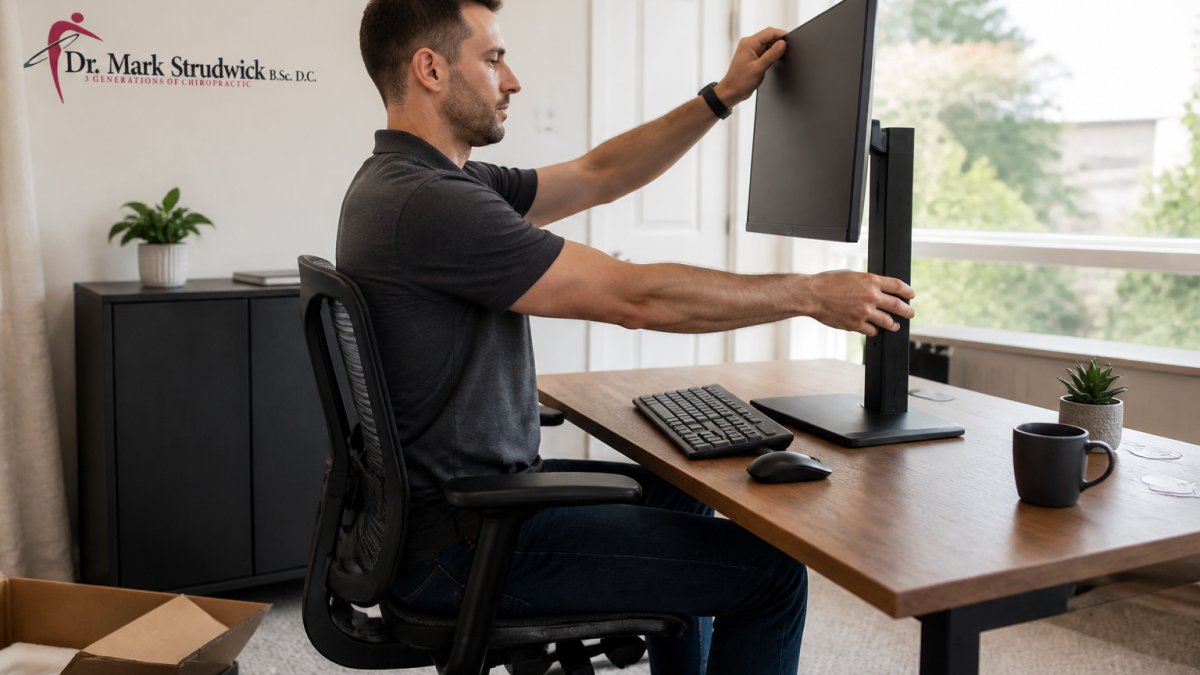
An ergonomic desk setup for neck pain starts with one rule: the screen comes to your eyes, not the other way around. Get that right and most of the load disappears.
A Step-by-Step Workstation Adjustment Checklist
Work through this list at your computer desk, in order:
- Raise your monitor so the top of the screen sits at eye level (The Young Workers Zone : Teaching Tools : Ergonomics: Workstations)
- Push the screen back to about an arm’s length away
- Set your office chair height so feet sit flat on the floor (CCOHS: Office Ergonomics)
- Adjust armrests so shoulders stay relaxed, not shrugged
- Bring the keyboard close so elbows stay near 90 degrees
- Add a laptop stand and separate keyboard if you work on a laptop
- Check lighting to reduce glare, which pulls your head forward (Source: guidelines on workplace ergonomics)
Watch out: raising a laptop on books without an external keyboard just moves the strain to your wrists and shoulders. The screen and keyboard need to move independently for a laptop setup to work.
If you would rather have your workstation assessed in person, you can book an office ergonomic consultation in Victoria, BC with our team.
Stretches for Neck Pain at Desk
Stretches for neck pain at desk work best when they are small, frequent, and gentle. Aggressive stretching of a sore neck tends to backfire.
Try these three moves, holding each for 20 to 30 seconds:
- Chin tuck: draw your chin straight back, as if making a double chin.
- Upper trap stretch: tilt your ear toward one shoulder, then switch sides.
- Doorway chest opener: place forearms on a door frame and step through gently.
Do them twice a day, plus once mid-afternoon. For a broader set of desk-friendly moves, see our stretches for back pain from sitting.
How to Prevent Neck Pain While Working
Prevention comes down to one habit: never stay in the same position for long. Your neck tolerates many postures. It does not tolerate any posture held for hours. Break reminders work best when they specify when, for how long, and what to do.
A Timed Desk-Break and Movement Routine
Use this simple schedule to prevent neck pain while working:
| Time | Action | Duration |
|---|---|---|
| Every 30 minutes | Stand, roll shoulders, chin tuck | 1 minute |
| Every 60 minutes | Walk to refill water or stretch | 3 minutes |
| Mid-morning | Upper trap and chest stretch | 2 minutes |
| After lunch | Short walk outside | 10 minutes |
| End of day | Full stretch routine | 5 minutes |
Set a timer for the first week. Many people underestimate how long they sit without moving, and a timer can help. Over time, the pattern may stick without the prompt.
The Micro-Break Menu
When your timer goes off, pick one item from this menu so you are not deciding what to do in the moment:
- Chin tuck: draw your chin straight back, as if making a double chin. Hold 3 seconds, repeat 5 times.
- Shoulder-blade squeeze: pull your shoulder blades down and together, hold 5 seconds, repeat 5 times.
- Standing extension: stand, place your hands on your lower back, and gently arch backward a few degrees. Hold 5 seconds, repeat 3 times.
- Doorway chest opener: place your forearms on a door frame and step through gently for 20 to 30 seconds.
- Walk-and-reset: walk for two minutes, then reset your monitor and chair before sitting down.
Building the Habit Without Willpower
- Pair breaks with existing cues: every time you refill water, finish a call, or send an email, do one micro-break.
- Use a timer or a break reminder app for the first week.
- Keep a resistance band or a small massage ball at your desk so the break takes seconds to start.
- Tracking your breaks for a few days can show how long you sit without moving.
The goal is not perfect posture. It is frequent position changes. A neck that moves through many positions during the day tolerates desk work far better than one held in a single “good” posture for hours.
For a broader set of desk-friendly moves, see our stretches for back pain from sitting.
When Desk Neck Pain Needs More Than a Stretch
Some neck pain needs professional assessment. Seek care if you notice:
- Sharp pain that does not ease with rest or heat
- Radiating pain, tingling, or numbness into the arm or hand
- Weakness or clumsiness in one hand
- Headaches that keep returning with desk work
- Pain after a fall or collision
If turning your head is painful or restricted, our article on neck pain when turning head causes and relief explains what may be behind it. Persistent symptoms are worth a proper assessment, and provincial health resources can guide you on urgent warning signs.
Book a Chiropractic Assessment for Desk-Related Neck Pain
Desk-related neck pain can persist once it becomes a pattern. A proper assessment identifies what is actually driving it: joint restriction, muscle tension, postural strain, or something else entirely.
At Strudwick Chiropractic, Dr. Mark Strudwick brings over 25 years of clinical experience and holds an International Certificate in Sports Chiropractic. Care at Strudwick Chiropractic is tailored to the individual. We also offer direct billing to insurance plans, ICBC, and WorkSafe, with free parking at Saanich Centre.
If you would like an assessment of your neck pain, book a chiropractor in Victoria, BC to discuss your options.
Frequently Asked Questions
Why does sitting cause neck pain?
Holding one position for a long time loads the same muscles and joints without a break. When the head drifts forward toward a screen, the neck and upper back muscles work harder to hold it up, which causes muscle tension and fatigue. Add limited movement and a poorly placed monitor, and the result is the familiar ache office workers describe as neck pain. Changing position regularly and setting up your workstation properly reduces that load.
How often should I take breaks to prevent neck pain at my desk?
A practical approach is a short movement break roughly every 30 to 45 minutes, even if it is only standing up, rolling the shoulders, and resetting your posture. Pair these micro-breaks with a longer walk or stretch every couple of hours. Setting a timer helps you actually do it. If you use stretches for neck pain at desk, keep them gentle and stop if anything causes sharp pain, tingling, or numbness.
What is the best desk posture to prevent neck pain?
Aim for a neutral head position with your ears roughly over your shoulders, feet flat on the floor, and the screen at about eye level so you are not looking down. Keep the keyboard close enough that your elbows stay near your sides. No single posture is perfect for hours, so the goal is to sit upright comfortably and change position often. If discomfort persists despite these changes, a professional assessment can identify what is driving it.
Your neck has been carrying your head through every workday for years. Give it the assessment it deserves. Get started with Strudwick Chiropractic and build a plan that addresses the cause, not just the ache.